
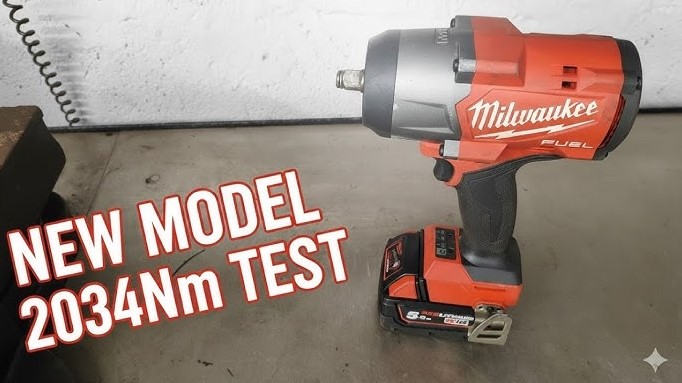
Many Milwaukee impact owners need the model number for parts, warranty checks, or tool comparisons. This small detail often hides in plain sight and causes confusion during quick searches. This guide clears that frustration with clear, simple steps.
Milwaukee places model numbers in specific spots based on tool type and generation. Most impacts show the number on the nameplate near the motor housing, battery slot, or handle base. Some versions display it under the belt clip or along the side label.
Cordless models usually print the model number close to the battery rail, while older designs may show it on the rear casing. Dirt and wear can blur the label, so a quick wipe helps reveal the text.
Original packaging and user manuals also list the exact model code. Accurate identification saves time and prevents wrong part orders. Clear knowledge about model number placement keeps tool maintenance smooth and stress free.
Where Is the Model Number on Milwaukee Impact?
Many tool owners face the same problem. The tool works fine, but the model number feels hard to find. Milwaukee impact tools include this number for a reason.
Repairs, parts, batteries, and warranty all depend on it. A clear guide helps save time and avoids mistakes. This article explains every detail in simple words. Short lines. Clear steps. No confusion.
What Is a Model Number on a Milwaukee Impact?
A model number identifies the exact tool version. Milwaukee produces many impact drivers and impact wrenches. Each model differs in torque, size, motor type, and battery system.
One wrong digit can point to a different tool. That error can cause part mismatch or battery issues.
Model numbers usually include:
-
Numbers
-
A dash
-
Sometimes letters
Example formats appear as 2853-20 or 2767-20. The full number matters.
Common Places Where Milwaukee Puts the Model Number
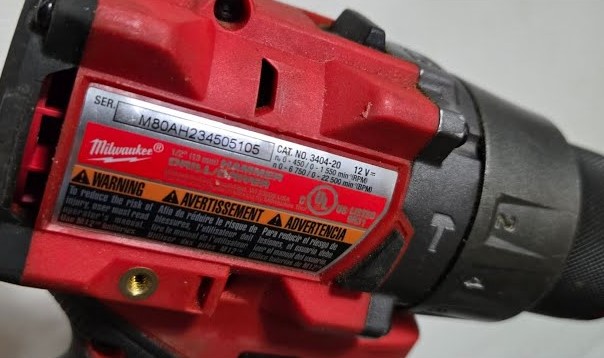
Milwaukee follows a pattern, but placement still varies by tool style and year.
Main Tool Housing Area
Most Milwaukee impact tools show the model number on the main red body.
Typical spots include:
-
Side panel near the motor
-
Flat surface above the trigger
-
Rear housing section
The label often uses white or black text. Plastic wear may reduce visibility over time.
Battery Compartment Area
Cordless Milwaukee impacts often place the model number near the battery base.
Steps that help:
-
Remove the battery pack
-
Inspect the inner plastic frame
-
Check the bottom edge of the tool
Many users miss this area. A close look helps.
Nameplate or Information Sticker
Milwaukee attaches an information sticker to many tools.
This sticker may show:
-
Model number
-
Serial number
-
Voltage
-
Safety marks
The sticker usually sits on a smooth surface. Dust and grease often hide it.
Handle and Grip Section
Some Milwaukee impact models place details near the handle.
Check these locations:
-
Back of the handle
-
Lower grip area
-
Side of the grip
Rubber grips may cover text edges. Light pressure helps reveal letters.
Cordless Impact Tools Model Number Location
Cordless Milwaukee impacts use batteries. That design affects label placement.
Common cordless spots:
-
Near the battery slide rails
-
Under the battery locking area
-
Side housing close to air vents
Battery removal gives better access.
Corded Impact Tools Model Number Location
Corded Milwaukee impacts follow a different layout.
Common corded spots:
-
Near the power cord entry
-
Rear housing plate
-
Side panel close to motor vents
Cord strain relief areas often sit near the label.
Model Number vs Serial Number Explained Clearly
Many users confuse these numbers.
Model number:
-
Same for every tool of that model
-
Identifies design and specs
Serial number:
-
Unique to one tool
-
Helps track production date
Both numbers usually appear near each other. Model number comes first in most cases.
Why Milwaukee Uses Different Model Number Locations?
Several factors affect placement:
-
Tool size
-
Motor position
-
Cooling vents
-
Grip design
Compact impacts need tighter layouts. Larger impacts allow wider label space.
What to Do When the Label Looks Faded or Missing?
Old tools face wear. Labels may fade or peel.
Helpful steps:
-
Clean the area with a dry cloth
-
Use bright light
-
Check all sides slowly
Some tools include stamped numbers. These marks last longer than stickers.
Finding the Model Number Without the Tool Label
Other sources may help.
Check these items:
-
Original box label
-
User manual front page
-
Purchase receipt
-
Tool case sticker
Retail listings often include the model number in the product name.
How the Model Number Helps With Batteries?
Milwaukee impacts use different battery systems.
The model number confirms:
-
M12 or M18 system
-
Battery compatibility
-
Charger match
Battery model numbers differ from tool model numbers. Both matter.
How the Model Number Helps With Replacement Parts?
Internal parts vary by model.
Model number helps match:
-
Anvils
-
Switches
-
Motors
-
Gear cases
Wrong parts cause poor fit or failure.
How the Model Number Helps With Warranty?
Milwaukee warranty service requires correct identification.
The model number helps:
-
Confirm coverage
-
Match service guides
-
Speed up support
Missing numbers slow the process.
FAQs
Does every Milwaukee impact tool include a model number?
Every Milwaukee impact tool includes a model number. Placement varies by design.
Can a serial number replace the model number?
A serial number alone does not confirm tool type. Both numbers work best together.
Does the battery show the tool model number?
The battery shows its own model number. That number does not identify the tool.
Can photos help find the model number?
Clear photos of all tool sides often help identify the model visually.
Does Milwaukee change model numbers often?
New versions may receive new model numbers. Small design changes can cause updates.
Conclusion
Finding the model number on a Milwaukee impact tool takes patience and a careful look. Labels appear on the body, battery area, handle, or rear housing. Each number plays a key role in repairs, batteries, and support. A few minutes of checking can save hours later.