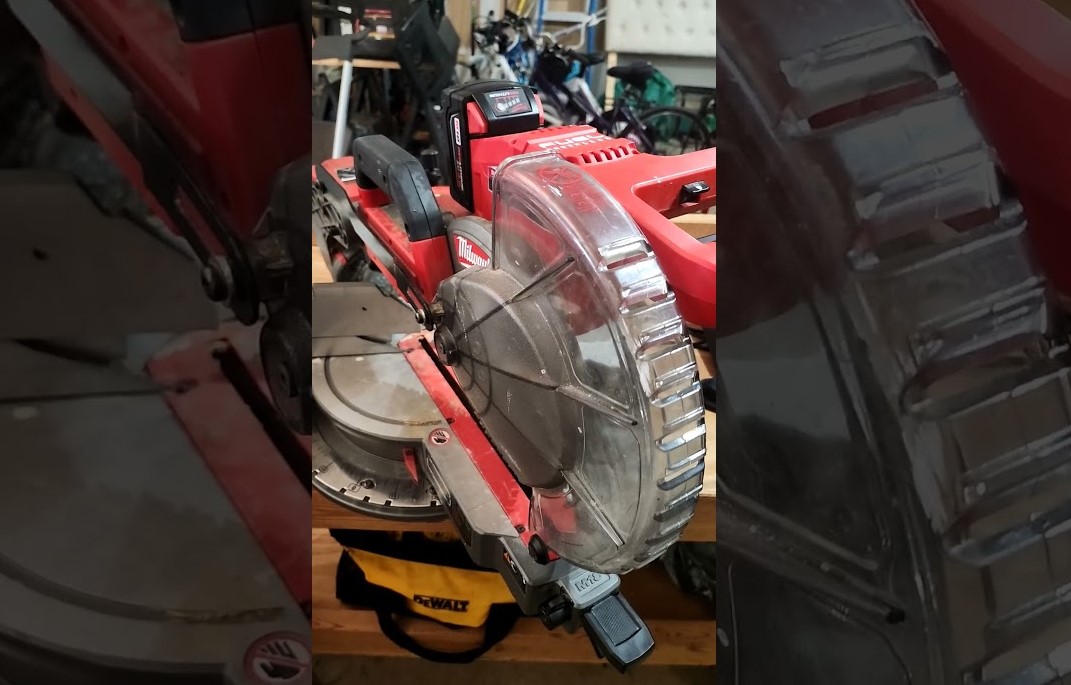
Many DIYers and carpenters rely on a Milwaukee miter saw for clean, accurate cuts. A locked saw can stop progress and cause confusion in the workshop. This quick guide explains the simple steps that release the lock and bring the tool back to action.
Clear instructions help beginners and experienced users handle the mechanism with confidence. Milwaukee designs its miter saws with safety locks that protect the blade and arm during storage or transport.
That safety feature sometimes puzzles new owners who try to raise the saw head for the first time. A small pin or lever usually controls the lock and a gentle pull or press frees the saw arm. Proper handling keeps the tool safe and prevents damage to internal parts.
Smart habits also extend the life of the saw and maintain cutting accuracy. This article explains the unlock process and shares tips for quick, safe operation today.
How to Unlock Milwaukee Miter Saw?
A miter saw helps cut wood with high accuracy. Many builders, carpenters, and home users rely on a Milwaukee miter saw for trim work, framing, and furniture projects. The tool includes several safety locks. These locks hold the saw in a fixed position during storage and transport. Safe transport matters. Safe storage matters too.
A first-time user may face confusion. The saw arm may stay down. The sliding head may refuse to move. The blade may not tilt. A small lock or knob usually causes this problem. Each part of the saw includes a control that holds it in place.
Clear knowledge helps solve the issue quickly. This guide explains every lock on a Milwaukee miter saw. Step-by-step instructions show how to release each one. Extra tips also help prevent damage and improve safety.
Understanding the Parts of a Milwaukee Miter Saw
Knowledge of the saw parts makes the process easier. A miter saw contains several moving sections.
Saw Arm
The arm holds the blade and motor. The arm moves up and down during cuts. A lock pin holds this arm in the down position during storage.
Blade Guard
A clear plastic guard covers the blade. The guard moves upward during a cut and drops back after the cut finishes.
Sliding Rail System
Many Milwaukee miter saw models include sliding rails. These rails allow the blade to move forward and backward. Wide boards require this feature.
Bevel System
The bevel feature tilts the blade left or right. This tilt creates angled cuts used for trim, molding, and frame joints.
Miter Table
The table rotates left and right. This rotation helps create angled cuts across a board. Each system includes a lock. A locked system stops movement. A released system allows adjustment.
Why a Milwaukee Miter Saw Stays Locked?
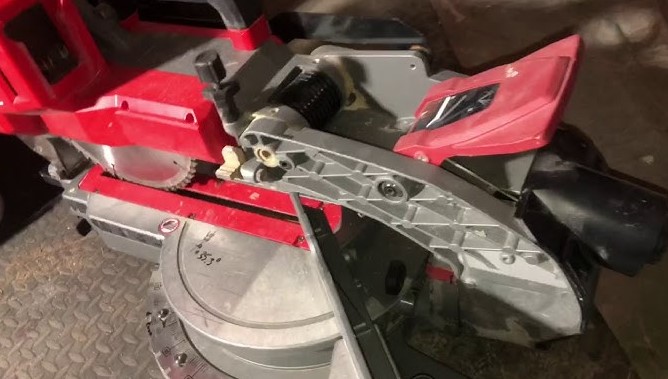
Several reasons may stop the saw from moving.
Common causes include:
-
The transport lock pin remains engaged
-
The rail lock knob stays tight
-
The bevel lever holds the blade angle
-
Dust blocks the hinge area
-
Pressure rests on the arm
Many new users forget about the transport lock. Manufacturers design this lock to protect the tool during shipping. A locked arm prevents damage to the blade and motor.
Safety Steps Before Touching the Saw
Safety must always come first. A miter saw blade spins at very high speed. Contact with the blade can cause serious injury. Follow these steps before adjusting the saw.
Disconnect the Power
Remove the power plug from the outlet. Cordless models require battery removal. No electricity should reach the motor.
Clear the Work Area
Remove scrap wood and tools from the table. Clean space helps prevent accidents.
Use Protective Gear
Basic safety gear helps protect the body.
Recommended items:
-
Safety glasses
-
Work gloves
-
Dust mask
Check Blade Condition
A damaged blade may move unexpectedly. A quick visual check helps confirm safety. Safe preparation reduces risk.
Step-by-Step Guide to Release the Arm Lock
The arm lock remains the most common issue. This lock holds the saw head down.
Step 1: Find the Lock Pin
The lock pin sits near the hinge of the saw arm. A small metal rod or knob acts as the lock. Most Milwaukee models place the pin near the rear pivot joint.
Step 2: Apply Light Downward Pressure
Push the handle down slightly. Light pressure releases tension from the lock pin. The pin may feel tight if pressure remains on it. A small push helps.
Step 3: Pull the Lock Pin Outward
Grip the pin with two fingers. Pull it straight outward. Some models require a slight twist while pulling. A small click may occur once the pin releases.
Step 4: Raise the Saw Arm Slowly
Lift the handle slowly after the pin moves out. The saw arm should rise to its normal position. The blade guard will move down over the blade. Gentle movement prevents sudden motion.
Releasing the Sliding Rail Lock
Sliding rails allow wide cuts. A locked rail prevents movement.
Step 1: Locate the Rail Lock Knob
The knob sits near the rail tubes behind the saw head. A large round knob usually controls this lock.
Step 2: Turn the Knob Left
Rotate the knob counterclockwise. Left rotation loosens the rail lock.
Step 3: Test the Rail Movement
Pull the saw head toward you. Push it back again. Smooth movement confirms the rail lock released. Tight rails may need one more turn of the knob.
Releasing the Bevel Lock
The bevel system tilts the blade. A locked bevel keeps the blade straight.
Step 1: Find the Bevel Lever
The lever sits behind the saw arm or near the rear housing.
Step 2: Move the Lever
Pull or rotate the lever. This motion releases the tilt lock.
Step 3: Adjust the Angle
Tilt the saw arm left or right. Angle marks appear on the bevel scale. These marks show the tilt degree.
Step 4: Tighten the Lever Again
Push the lever back to hold the selected angle. Stable locking ensures accurate cuts.
Releasing the Miter Table Lock
The miter table rotates for angled cuts across the board.
Step 1: Locate the Miter Handle
The handle usually sits at the front of the saw table.
Step 2: Turn the Handle
Rotate the handle counterclockwise.
This action releases the table lock.
Step 3: Rotate the Table
Move the table left or right to select the desired angle.
Common angles include:
-
0 degrees for straight cuts
-
45 degrees for corner joints
-
22.5 degrees for trim work
Step 4: Lock the Table
Turn the handle clockwise again. The table should remain stable after locking.
Signs the Saw Is Fully Unlocked
A quick check confirms that the saw operates normally.
Look for these signs:
-
The arm moves up and down smoothly
-
The sliding rails move forward and back
-
The blade tilts without resistance
-
The table rotates freely
Smooth movement shows correct setup.
Common Problems and Simple Fixes
Several small issues may prevent movement.
Dust Around the Lock Pin
Wood dust collects near moving parts.
Fix:
-
Use a small brush
-
Blow air into the hinge area
Rust on the Lock Pin
Long storage may cause rust.
Fix:
-
Apply a small drop of machine oil
-
Move the pin several times
Tight Rail Lock
A rail knob may remain partially tight.
Fix:
-
Turn the knob another half turn
-
Test the rail again
Regular cleaning prevents most problems.
Maintenance Tips for Smooth Operation
Regular care keeps the saw easy to adjust. Important habits include:
Clean After Each Project
Remove dust from rails, hinges, and the base. Dust build-up causes many lock problems.
Lubricate Moving Parts
Light oil helps metal parts move smoothly.
Small lubrication points include:
-
Lock pins
-
Hinges
-
Rail surfaces
Inspect Locks Monthly
Check the condition of knobs and levers. Loose or worn parts may reduce cutting accuracy.
Store the Saw Correctly
Lower the arm and engage the lock pin before storage. This position protects the motor and rails.
Helpful Tips for Beginners
Many beginners feel unsure during the first setup. Simple habits make the process easier.
Useful tips:
-
Move the saw slowly during adjustments
-
Keep both hands away from the blade area
-
Test all movements before cutting wood
-
Practice with scrap wood first
Confidence grows with practice.
FAQs
Why does my Milwaukee miter saw arm not rise after pulling the pin?
Pressure may still rest on the arm. Push the handle down slightly and pull the pin again.
Can dust stop the lock pin from moving?
Yes. Dust and small wood chips can block the pin area. Cleaning the hinge area often solves the problem.
Why does the saw head not slide forward?
The rail lock knob may remain tight. Turn the knob left until the rail moves freely.
Should the saw remain plugged in during adjustment?
No. Remove power before touching any part of the saw. Safety should always come first.
How often should I clean my miter saw?
Cleaning after every project works best. Dust builds quickly during wood cutting.
Conclusion
A Milwaukee miter saw includes several locks that protect the tool during transport and storage. The arm lock pin, rail lock knob, bevel lever, and miter table handle each control a different movement.
Simple steps allow safe release of these locks. Light pressure on the saw handle often helps the pin move smoothly. Clean parts, regular checks, and careful handling keep the saw working properly. Good maintenance also improves cutting accuracy and extends the life of the tool.