Owning Milwaukee tools comes with the advantage of quality, durability, and a warranty that protects your investment. Registering your tools ensures access to this warranty, along with product updates, recalls, and exclusive offers.
The registration process remains simple and straightforward, designed to save time while keeping your tools and information secure. A registered tool allows easy tracking for repairs, replacements, or service support, giving peace of mind to both professionals and DIY enthusiasts.
Beyond warranty benefits, registration provides insights into your tool’s performance, helping you maintain it efficiently and extend its lifespan. Staying organized with your tool details also simplifies managing multiple devices at once.
Taking a few minutes to complete registration today can prevent complications later and maximize the value of your Milwaukee tools. This guide walks through each step clearly, ensuring the process remains smooth and stress-free.
How to Register Milwaukee Tools?
Owning a Milwaukee tool is a smart investment. These tools are strong, reliable, and last a long time. Registering your tool adds extra value
It gives warranty coverage, access to service, and protection if the tool has a problem. This article explains every step of registering Milwaukee tools in detail and offers tips to make the process easy.
Why You Should Register Milwaukee Tools?
Tool registration is not just a formality. It has real benefits that save time, money, and trouble.
Warranty Protection
Every Milwaukee tool has a warranty. This can cover repairs or replacements if your tool stops working due to a manufacturing defect. Only registered tools receive full warranty coverage.
Access to Customer Support
Registered tools allow customer service to quickly verify your purchase. This makes it easier to fix problems, answer questions, or schedule repairs.
Updates and Notifications
Milwaukee may issue safety notices, product updates, or recalls. Registered tools receive notifications so you can take action immediately.
Proof of Ownership
Registration acts as proof that you own the tool. This is useful if the tool is lost, stolen, or damaged and you need to claim insurance.
Step-by-Step Guide to Register Milwaukee Tools
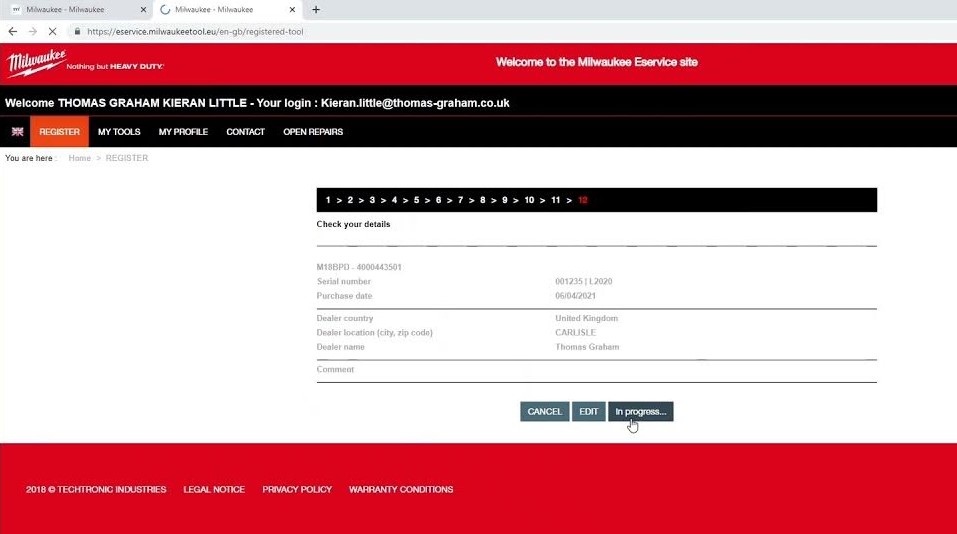
Follow these steps carefully. They are simple but important.
Step 1: Collect Important Tool Information
Before starting, find the following details:
-
Model Number: Found on the tool or box. Example: M18 FUEL 2753-20.
-
Serial Number: A unique code for each tool, usually on a metal plate or sticker. Example: 1234567890.
-
Purchase Date: Check your receipt or invoice.
-
Store or Website Name: Where you bought it.
Having these ready makes registration faster and avoids errors.
Step 2: Go to the Official Milwaukee Tool Registration Page
Open your web browser. Enter the official Milwaukee website (milwaukeetool.com). On the homepage, search for “Tool Registration” in the menu. Avoid using unofficial websites. Only the official site ensures your tool is properly registered.
Step 3: Fill in Your Personal Information
Milwaukee needs your contact information to link the tool to you. Enter:
-
Full Name
-
Email Address (make sure it is active)
-
Phone Number (optional, but useful)
-
Mailing Address
Correct information ensures you can be reached for warranty or safety notifications.
Step 4: Enter Tool Details Accurately
Input the information you collected in Step 1:
-
Model Number
-
Serial Number
-
Purchase Date
-
Store or Website Name
Double-check everything. Even one wrong number can prevent successful registration.
Step 5: Confirm and Submit
Check all entries again. Confirm your email address. Click Submit or Register Tool. You will see a confirmation page. It may include:
-
Registration ID
-
Tool details
-
Warranty period
Step 6: Save Your Confirmation
Save a screenshot or email of your confirmation. This acts as proof of registration. Keep it in a safe folder or document for future reference.
Extra Information About Milwaukee Tool Registration
Warranty Periods
-
Standard Hand Tools: Usually 1–5 years, depending on the tool type.
-
Power Tools (Battery Tools): Often 3–5 years for tools and 2 years for batteries.
-
Accessories: Warranty periods vary, but registration ensures coverage.
Tools Bought Used
Used tools can be registered. Warranty may depend on the original purchase date. Always keep a copy of the receipt.
Multiple Tool Registration
You can register several tools under one account. Each tool must have its own model and serial number. This keeps your account organized and all warranties active.
Common Mistakes to Avoid
-
Entering the wrong serial number.
-
Forgetting to confirm the email address.
-
Using unofficial websites.
-
Delaying registration after purchase.
Practical Tips for Non-Native Speakers
-
Use a computer or tablet instead of a phone for easier typing.
-
Write down all numbers carefully. Serial numbers often mix letters and digits.
-
Take a photo of your tool’s serial number and receipt for safety.
-
Check spam or junk folders for confirmation emails.
Final Thoughts
Registering your Milwaukee tools protects your investment and ensures access to support, updates, and warranty coverage. It only takes a few minutes but saves future trouble.
Always gather tool details before registration and double-check your entries. Registered tools stay protected, easier to service, and give peace of mind.
FAQs
1. Can I register a Milwaukee tool after one year?
Yes, but warranty coverage starts from the original purchase date. Early registration is better.
2. Do batteries need separate registration?
Yes. Milwaukee recommends registering batteries separately for full warranty coverage.
3. What if I forget the serial number?
The serial number is on the tool body or packaging. You must have it for registration.
4. Can I register my tool without a receipt?
Yes, but proof of purchase helps if warranty service is needed.
5. Is registration free?
Yes. Milwaukee does not charge for tool registration.